mod overview
Extreme Reactors
vunknown for Minecraft 1.20.1
Adds large, multiblock power generation machines to Minecraft. This is a continuation of the 1.7.10 mod Big Reactors from ErogenousBeef
Adds 125 items, 139 recipes, 60 guidebook entries.
by ZeroNoRyouki · MIT
Guidebook
Guidebook: Erguide
The Fluidizer (2)
How to build 2 pages
The Fluidizer is a 3x3x3 (minimum size) machine build from Casing blocks and a mix of the other device parts.
Glass can be used in place of Casing blocks in the all faces of the machine (but not on the frame).
Check each Fluidizer part page for restriction on where each part can be placed.
Glass can be used in place of Casing blocks in the all faces of the machine (but not on the frame).
Check each Fluidizer part page for restriction on where each part can be placed.
Unrecognized page type: zcmultiblock
Operational mode 2 pages
The Fluidizer can process materials in the following three different modality, depending on the type and number of Injectors in the machine:
Solid mode : turn solid fuel sources (like ingots) into fluid fuel. To enable this modality you need one, and only one, Solid Injector in the machine.
Solid mode : turn solid fuel sources (like ingots) into fluid fuel. To enable this modality you need one, and only one, Solid Injector in the machine.
Solid Mixing mode : turn two solid fuel sources (like ingots) into fluid and mix them to make a new fuel type. To enable this modality you need two, and only two, Solid Injectors in the machine.Fluid Mixing mode : mix two fluid fuels into a new fuel type. To enable this modality you need two, and only two, Fluid Injectors in the machine.
Fluidizer parts (7)
Solid Injector 2 pages


The Solid Injector allow you to insert existing solid fuel sources (like ingots) into the Fluidizer to convert them to fluid or mix them and create a new fuel.
Unrecognized page type: crafting-part_usage
Casing 2 pages


Casing blocks are the building blocks of the Fluidizer.
They are required to build its frame and are also used to craft the other parts. Casing blocks can also be used to fill the faces of the Fluidizer if you don't like glass too much.
They are required to build its frame and are also used to craft the other parts. Casing blocks can also be used to fill the faces of the Fluidizer if you don't like glass too much.
Unrecognized page type: crafting-part_usage
Controller 3 pages


The Controller is your main interface to the Fluidizer.
Right click on the Controller to open it's graphical user interface and from there you can turn the Fluidizer on or off, check how much fluid and energy are present in the machine and the status of the current job.
Right click on the Controller to open it's graphical user interface and from there you can turn the Fluidizer on or off, check how much fluid and energy are present in the machine and the status of the current job.
crafting-text: If you hover on a control in the interface, a tooltip will be displayed with additional information or an explanatory text for that control.
part_usage: Mandatory: at least one is required
Valid positions: any vertical face (not on frame)
Graphical interface: yes
Valid positions: any vertical face (not on frame)
Graphical interface: yes
Fluid Injector 2 pages


The Fluid Injector allow you to insert existing fluid fuels into the Fluidizer to mix them and create a new fuel.
Unrecognized page type: crafting-part_usage
Glass 2 pages
 Fluidizer Glass
 Glass blocks are decorative blocks that can be used, instead of a Casing block, to show the interior of the Fluidizer.
Unrecognized page type: crafting-part_usage
… and 2 more
Output Port 2 pages


The Output Port allow you to extract the fluid fuel from the Fluidizer.
You can connect a pipe of sort to extract the fuel automatically.
You can connect a pipe of sort to extract the fuel automatically.
Unrecognized page type: crafting-part_usage
Power Port 2 pages


The Power Port allow you to provide the energy needed to power the Fluidizer.
Any Forge Energy compatible cable or generator can be connected to the Power Port.
Any Forge Energy compatible cable or generator can be connected to the Power Port.
Unrecognized page type: crafting-part_usage
Reactor parts (14)
Fuel Injection Port 3 pages


The Fuel Injection Port allow you to insert or extract fluid reactants that will fill your Fuel Rods and power your Reactor.
In the graphical interface you can set the Port mode: in inlet mode the Port will accept fluid fuel, in outlet mode it will output fluid wastes.
In the graphical interface you can set the Port mode: in inlet mode the Port will accept fluid fuel, in outlet mode it will output fluid wastes.
crafting-text: A wrench can be used to change the Port mode.
Unlike with the Solid Access Port, there is no loss of material using the Fuel Injection Port.
Unlike with the Solid Access Port, there is no loss of material using the Fuel Injection Port.
part_usage: Mandatory: no
Valid positions: any face (not on frame)
Variants: Reinforced
Graphical interface: yes
Wrench: a wrench can be used to toggle the Port mode
Valid positions: any face (not on frame)
Variants: Reinforced
Graphical interface: yes
Wrench: a wrench can be used to toggle the Port mode
Forge Fluid Port 3 pages


The Forge Fluid Port allows you to insert or extract fluids from an actively cooled Reactor.
This Port accepts and emits vanilla fluids but only if they are valid coolants or vapors.
A wrench can be used to change the Port from input to output mode.
This Port accepts and emits vanilla fluids but only if they are valid coolants or vapors.
A wrench can be used to change the Port from input to output mode.
Unrecognized page type: bigreactors:crafting1x
bigreactors:part_usage: Mandatory: no
Valid positions: any face (not on frame)
Variants: Reinforced
Graphical interface: no
Wrench: a wrench can be used to toggle the Port mode.
Valid positions: any face (not on frame)
Variants: Reinforced
Graphical interface: no
Wrench: a wrench can be used to toggle the Port mode.
Forge Energy Power Tap 5 pages


The Forge Energy Power Tap allows you to extract energy from a passively cooled Reactor.
As the name implies, this Power Tap outputs energy using the Forge Energy power system and so it can be connected only to pipes or machines compatible with that system.
As the name implies, this Power Tap outputs energy using the Forge Energy power system and so it can be connected only to pipes or machines compatible with that system.
Only one power system can be used for each Reactor and so only one type of Power Tap can be used to build a single Reactor.
The Power Tap is available in both passive and active forms.
The Power Tap is available in both passive and active forms.
Unrecognized page type: bigreactors:crafting1x
Unrecognized page type: bigreactors:crafting1x
bigreactors:part_usage: Mandatory: no
Valid positions: any face (not on frame)
Variants: all
Graphical interface: no
Power system: Forge Energy
Valid positions: any face (not on frame)
Variants: all
Graphical interface: no
Power system: Forge Energy
Forge Charging Port 4 pages


The Forge Charging Port allows you to use the energy stored in your passively cooled Reactor to charge items that use the the Forge Energy power system to function.
Open the graphical interface of the port and insert the item you want charged into the input slot in the center.
Open the graphical interface of the port and insert the item you want charged into the input slot in the center.
Once the item energy buffer is full, the item will be automatically moved to the interface output slot for you to collect.
If, for any reason, you need to stop the charging process, press the eject button to move the item to the output slot immediately.
If, for any reason, you need to stop the charging process, press the eject button to move the item to the output slot immediately.
Unrecognized page type: bigreactors:crafting1x
bigreactors:part_usage: Mandatory: no
Valid positions: any face (not on frame)
Variants: all
Graphical interface: yes
Valid positions: any face (not on frame)
Variants: all
Graphical interface: yes
Creative Water Generator 2 pages


The Water Generator is a creative only part that acts as a constant source of water for an actively cooled Reactor.
This part automatically supplies one bucket of water to the Coolant Fluid Tank, but only when the Reactor is turned on.
This part automatically supplies one bucket of water to the Coolant Fluid Tank, but only when the Reactor is turned on.
bigreactors:part_usage: Mandatory: no
Valid positions: any face (not on frame)
Variants: Reinforced
Graphical interface: no
Creative mode: this part is only available in creative mode and there is no crafting recipe for it.
Valid positions: any face (not on frame)
Variants: Reinforced
Graphical interface: no
Creative mode: this part is only available in creative mode and there is no crafting recipe for it.
… and 9 more
Fuel Rod 4 pages
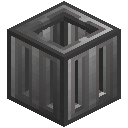 Reactor Fuel Rod (Reinforced)
 The Fuel Rods are placed inside your Reactor in long horizontal or vertical piles.
They act as a reservoir of reactants (either fuel or waste or a mix of the two) and are irradiated while the Reactor is turned on to generate the heat that ultimately will be converted to energy or used to vaporize coolants.
They act as a reservoir of reactants (either fuel or waste or a mix of the two) and are irradiated while the Reactor is turned on to generate the heat that ultimately will be converted to energy or used to vaporize coolants.
The first Fuel Rod of each pile must follow a Casing block and the last Fuel Rod of each pile must the followed by a Control Rod.
You can make all your Fuel Rod piles vertical (following the Y axis) or horizontal (following either the X or Z axis) but you can't mix and match.
Note that as a consequence of this requirement, all your Control Rods must be placed on the same face of the Reactor.
You can make all your Fuel Rod piles vertical (following the Y axis) or horizontal (following either the X or Z axis) but you can't mix and match.
Note that as a consequence of this requirement, all your Control Rods must be placed on the same face of the Reactor.
Unrecognized page type: bigreactors:crafting1x
bigreactors:part_usage: Mandatory: yes
Valid positions: inside the Reactor
Variants: all
Graphical interface: no
Valid positions: inside the Reactor
Variants: all
Graphical interface: no
Control Rod 4 pages


Control Rods can be inserted into their respective Fuel Rods pile and are made of a material that can absorb the neutron radiation that will otherwise hit the reactants stored in the Fuel Rods, slowing down or stopping the consumption of fuel and the generation of heat and waste.
Right click on a Control Rod to open its graphical user interface.
In the interface you could assign a name to the Control Rod that can later be used to reference this specific Control Rod while using the Computer Port to manage the Reactor.
The insertion percentage specify how much the Control Rod is inserted into it's Fuel Rod pile. You can change the value for only this Control Rods or for all of them.
In the interface you could assign a name to the Control Rod that can later be used to reference this specific Control Rod while using the Computer Port to manage the Reactor.
The insertion percentage specify how much the Control Rod is inserted into it's Fuel Rod pile. You can change the value for only this Control Rods or for all of them.
Unrecognized page type: bigreactors:crafting1x
bigreactors:part_usage: Mandatory: yes
Valid positions: all on a single face, following a Fuel Rod
Variants: all
Graphical interface: yes
Valid positions: all on a single face, following a Fuel Rod
Variants: all
Graphical interface: yes
Casing 3 pages


Casing blocks are the building blocks of the Reactor.
They are required to build its frame and are also used to craft the other parts. Casing blocks can also be used to fill the faces of the Reactor if you don't like glass too much.
You will craft a ton of them.
They are required to build its frame and are also used to craft the other parts. Casing blocks can also be used to fill the faces of the Reactor if you don't like glass too much.
You will craft a ton of them.
Unrecognized page type: bigreactors:crafting1x
bigreactors:part_usage: Mandatory: they are required to build the frame
Valid positions: any
Variants: all
Graphical interface: no
Valid positions: any
Variants: all
Graphical interface: no
Glass 3 pages
Reactor Glass (Reinforced) Glass blocks are decorative blocks that can be used, instead of a Casing block, to show the interior of the Reactor.
Unrecognized page type: bigreactors:crafting1x
bigreactors:part_usage: Mandatory: no
Valid positions: any face (not on frame)
Variants: all
Graphical interface: no
Valid positions: any face (not on frame)
Variants: all
Graphical interface: no
Controller 4 pages


The Controller is your main interface to the Reactor.
Right click on the Controller to open it's graphical user interface and from there you can turn the Reactor on or off, check how much reactant is present in the Fuel Rods, how hot the Reactor is and so on.
Right click on the Controller to open it's graphical user interface and from there you can turn the Reactor on or off, check how much reactant is present in the Fuel Rods, how hot the Reactor is and so on.
Depending on the operational mode of the Reactor, you can also check the status of its internal energy buffer and production ratio for passively cooled Reactors or the amount of coolant and vapor present in an actively cooled Reactor.
If you hover on a control in the interface, a tooltip will be displayed with additional information or an explanatory text for that control.
If you hover on a control in the interface, a tooltip will be displayed with additional information or an explanatory text for that control.
Unrecognized page type: bigreactors:crafting1x
bigreactors:part_usage: Mandatory: at least one is required
Valid positions: any face (not on frame)
Variants: all
Graphical interface: yes
Valid positions: any face (not on frame)
Variants: all
Graphical interface: yes
Redstone Port 7 pages


The Redstone Port allows you to automate your Reactor using Redstone.
Open the Port graphical interface to configure it. You can then choose between three input settings (that listen for a Redstone signal) and six output ones (that emit a Redstone signal).
Open the Port graphical interface to configure it. You can then choose between three input settings (that listen for a Redstone signal) and six output ones (that emit a Redstone signal).
Input settings
Perform one of the following actions when a Redstone signal is received
On / Off : turn the Reactor on or off depending on the signal receivedEject Waste : eject waste material to Access Ports in outlet modeControl Rods Insertion : set the insertion percentage of all Control Rods in the Reactor.
Perform one of the following actions when a Redstone signal is received
On / Off : turn the Reactor on or off depending on the signal receivedEject Waste : eject waste material to Access Ports in outlet modeControl Rods Insertion : set the insertion percentage of all Control Rods in the Reactor.
Output settings
Emit a Redstone signal when one of the following conditions are meet
Casing heat : the heat of the Reactor Casing is above, below or in between a given temperatureCore heat : the heat of the Reactor Core is above, below or in between a given temperatureFuel Richness : the Fuel Richness percentile is above, below or in between a given value
Emit a Redstone signal when one of the following conditions are meet
Casing heat : the heat of the Reactor Casing is above, below or in between a given temperatureCore heat : the heat of the Reactor Core is above, below or in between a given temperatureFuel Richness : the Fuel Richness percentile is above, below or in between a given value
Fuel Amount : the amount of fuel available is above, below or in between a given valueWaste Amount : the amount of waste available is above, below or in between a given value.Energy Stored : the amount of energy stored in the internal energy buffer is above, below or in between a given value.Coolant amount : the amount of coolant in the Turbine is above, below or in between a given value
Vapor amount : the amount of vapor in the Turbine is above, below or in between a given value
You will usually need two or more Redstone Ports to fully automate a Reactor.
For more complex automation, check the Computer Port.
You will usually need two or more Redstone Ports to fully automate a Reactor.
For more complex automation, check the Computer Port.
Unrecognized page type: bigreactors:crafting1x
bigreactors:part_usage: Mandatory: no
Valid positions: any face (not on frame)
Variants: all
Graphical interface: yes
Valid positions: any face (not on frame)
Variants: all
Graphical interface: yes
Computer Port 3 pages


The Computer Port allows you to connect your Reactor to a computer for complex automation tasks.
A standard set of methods is exposed to the connected computer and you can use them to query the status of the Reactor and control its behavior.
A standard set of methods is exposed to the connected computer and you can use them to query the status of the Reactor and control its behavior.
crafting-text: To use the Computer Port you need an external mod that adds programmable computers to the game.
Currently the only such mod supported (and available) is CC:Tweaked.
Currently the only such mod supported (and available) is CC:Tweaked.
bigreactors:part_usage: Mandatory: no
Valid positions: any face (not on frame)
Variants: Reinforced
Graphical interface: no
Valid positions: any face (not on frame)
Variants: Reinforced
Graphical interface: no
Mekanism Fluid Port 2 pages


The Mekanism Fluid Port allows you to extract vapor from an actively cooled Reactor as a Mekanism Gas.
This Port automatically converts the vapor into a gas if a Mekanism Rotary recipe exists for the fluid stored inside the Reactor. The conversion rate as defined by the Rotary recipe is respected.
This Port automatically converts the vapor into a gas if a Mekanism Rotary recipe exists for the fluid stored inside the Reactor. The conversion rate as defined by the Rotary recipe is respected.
Unrecognized page type: crafting-part_usage
Solid Access Port 4 pages


The Solid Access Port converts solid materials (usually ingots) into fuel reactants that will fill your Fuel Rods and power your Reactor.
In the graphical interface you can set the Port mode: in inlet mode the Port will accept fuel source materials, in outlet mode it will output waste.
In the graphical interface you can set the Port mode: in inlet mode the Port will accept fuel source materials, in outlet mode it will output waste.
A wrench can be used to change the Port mode.
The graphical interface can also be used to insert and extract materials manually.
The Solid Access Port is a quick solution to add fuel to your Reactor but, like every quick solution ever, it is not perfect and a small material loss is unavoidable.
The graphical interface can also be used to insert and extract materials manually.
The Solid Access Port is a quick solution to add fuel to your Reactor but, like every quick solution ever, it is not perfect and a small material loss is unavoidable.
Unrecognized page type: bigreactors:crafting1x
bigreactors:part_usage: Mandatory: no, but you will need a couple anyway
Valid positions: any face (not on frame)
Variants: all
Graphical interface: yes
Wrench: a wrench can be used to toggle the Port mode.
Valid positions: any face (not on frame)
Variants: all
Graphical interface: yes
Wrench: a wrench can be used to toggle the Port mode.
Other stuff (4)
The Coolants System 3 pages
An actively cooled Reactor / Turbine setup vaporizes a coolant using the heat of the Reactor to generate a vapor that can be used to drive the rotors of many Turbines and generate energy.
A coolant is a fluid that, if recognised, can be pumped into the Coolant Fluid Tank of the Reactor using a Fluid Port in input mode.
A coolant is a fluid that, if recognised, can be pumped into the Coolant Fluid Tank of the Reactor using a Fluid Port in input mode.
A vapor is a fluid that is the result of a coolant being vaporized inside a Reactor, and that can be pumped from a Reactor to a Turbine (using Fluid Port) to be used to drive the Turbine rotor and then be condensed back to the original coolant to let the cycle start again.
Only valid coolants and vapors can be used inside a Reactor or a Turbine.
Only valid coolants and vapors can be used inside a Reactor or a Turbine.
Extreme Reactors register, by default, water as a valid coolant and steam as it resulting vapor.
Other mods or mod packs can add their own fluids or modify/remove the default ones.
Other mods or mod packs can add their own fluids or modify/remove the default ones.
Power Systems 2 pages
Extreme Reactor energy generators are, by design, not tied to any particular power system that exists today in the world of Minecraft.
Energy is generated and then converted on the fly by the Power Taps when it is extracted from the internal energy buffer.
Energy is generated and then converted on the fly by the Power Taps when it is extracted from the internal energy buffer.
The Power Taps installed in your Reactor or Turbine define the output energy system of the machine.
Currently the mod come with a Forge Energy Power Tap that sends out Forge Energy units.
Other power systems can easily be supported by adding new types of Power Taps.
Currently the mod come with a Forge Energy Power Tap that sends out Forge Energy units.
Other power systems can easily be supported by adding new types of Power Taps.
Passive and Active Parts 2 pages
Some Reactor or Turbine parts that interact with external blocks are available in a passive or active form, or both.
A passive part does nothing by itself. It does not try to send out energy, fluids or items nor does it try to acquire them. The block connected to the part needs to take the initiative and start the transfer.
A passive part does nothing by itself. It does not try to send out energy, fluids or items nor does it try to acquire them. The block connected to the part needs to take the initiative and start the transfer.
An active part is always looking for an opportunity to extract items and fluids or to send out power, items and fluids to the connected block but it does not allow the connected block to insert or extract anything from the part.
By mixing active and passive parts you can fine tune your resources distribution and acquisition network.
By mixing active and passive parts you can fine tune your resources distribution and acquisition network.
The Extreme Wrench 1 page
 Extreme Wrench
 The Extreme Wrench is.. hum.. a wrench.
You can use it to change the input/output mode of parts such as the Access Port or the Fluid Ports.
The wrench is tagged as a Forge wrench so you should be able to use it in other mods too.
You can use it to change the input/output mode of parts such as the Access Port or the Fluid Ports.
The wrench is tagged as a Forge wrench so you should be able to use it in other mods too.
Operational mode (2)
Active Cooling 2 pages
A actively cooled Reactor is a Reactor that uses an external coolant to dissipate it's internal heat.
The coolant will be vaporized in the process and the resulting vapor can be extracted from the Reactor to drive the rotors of one or more Turbines.
The coolant will be vaporized in the process and the resulting vapor can be extracted from the Reactor to drive the rotors of one or more Turbines.
To build an actively cooled Reactor you need to include at least two Fluid Ports in the multiblock, one configured to insert a coolant into the Reactor and one to extract the generated vapor from the Reactor.
The extracted vapor can then be piped into your Turbines to generate energy.
The extracted vapor can then be piped into your Turbines to generate energy.
Passive Cooling 1 page
A passively cooled Reactor is a Reactor that generates energy directly and that does not use an external medium to dissipate it's internal heat.
The first Reactor described in the early pages of this book is a Reactor operating in Passive Cooling mode.
The first Reactor described in the early pages of this book is a Reactor operating in Passive Cooling mode.
The Reactor (3)
Inner workings 2 pages
How does a Reactor generate energy or vaporize coolants?
With heat.
Irradiated fuel heats up, moderators absorb part of the radiation and move heat away from the Fuel Rods and toward the Casing.
The Casing Heat is what, in the end, generates energy or vaporizes coolants.
With heat.
Irradiated fuel heats up, moderators absorb part of the radiation and move heat away from the Fuel Rods and toward the Casing.
The Casing Heat is what, in the end, generates energy or vaporizes coolants.
Moving heat away from the Fuel Rods is a very important aspect of your Reactor design and moderators play a key role in it. It is also important to mention that radiation travels in every direction perpendicular to the Fuel Rods pile axis.
Please note that, while being close enough to let you create the best Reactors possible, this is an oversimplification of what's really going on inside your Reactor.
Please note that, while being close enough to let you create the best Reactors possible, this is an oversimplification of what's really going on inside your Reactor.
Moderators 3 pages
A radiation moderator is a block or fluid that can be placed inside the Reactor to absorb part of the radiation emitted by the fuel and move heat away from the Fuel Rods.
A particular moderator could convert radiation to heat more or less efficiently than another one, or could absorb more radiation than others. Or it could conduct heat way better than it's companions.
A particular moderator could convert radiation to heat more or less efficiently than another one, or could absorb more radiation than others. Or it could conduct heat way better than it's companions.
Or it could be dirty cheap but extremely inefficient all around. Like air for example: it works, but barely.
Usually a rare block/fluid, or one particularly expensive to craft, has better stats than a common, or cheap, one.
Extreme Reactors register, by default, a score of vanilla and modded blocks/fluids as moderators.
Other mods or mod packs can add their own moderators or modify/remove the default ones.
Usually a rare block/fluid, or one particularly expensive to craft, has better stats than a common, or cheap, one.
Extreme Reactors register, by default, a score of vanilla and modded blocks/fluids as moderators.
Other mods or mod packs can add their own moderators or modify/remove the default ones.
Only valid moderators can be placed inside the Reactors. Invalid moderators will prevent the Reactor multiblock from forming.
Blocks and fluids (check the bucket) that can be used as moderators are marked with a special tooltip that you can see if you want to spoiler yourself and you have enabled the Advanced Tooltips feature of Minecraft (F3 + H).
Blocks and fluids (check the bucket) that can be used as moderators are marked with a special tooltip that you can see if you want to spoiler yourself and you have enabled the Advanced Tooltips feature of Minecraft (F3 + H).
Reactants 4 pages
A reactant is a chemical substance that you can use inside your Reactor to sustain a nuclear reaction.
There are two types of reactants:Fuel: literally, the fuel that sustains the nuclear chain reaction inside the Fuel RodsWaste: the byproduct of the reaction once the fuel is consumed.
There are two types of reactants:Fuel: literally, the fuel that sustains the nuclear chain reaction inside the Fuel RodsWaste: the byproduct of the reaction once the fuel is consumed.
Extreme Reactors register, by default, four reactants: the fuels named Yellorium and Blutonium and their associated wastes, Cyanite and Magentite.
Every reactant has a list of items that can be used to produce that reactant by, for example, inserting then in a Solid Access Port.
Yellorium, for example, can be obtained from Yellorium Ingots. Cyanite, when ejected from the Reactor, turn into Cyanite Ingots.
Every reactant has a list of items that can be used to produce that reactant by, for example, inserting then in a Solid Access Port.
Yellorium, for example, can be obtained from Yellorium Ingots. Cyanite, when ejected from the Reactor, turn into Cyanite Ingots.
Some reactants can be produced in the Reprocessor by converting wastes into new fuel sources.
Each type of Fuel has it's own properties and behave differently inside the Reactor
Other mods or mod packs can add their own reactants, fuel types and reactants source or modify/remove the default ones.
Each type of Fuel has it's own properties and behave differently inside the Reactor
Other mods or mod packs can add their own reactants, fuel types and reactants source or modify/remove the default ones.
Items that can be used to produce a reactant of the fuel type are marked with a special tooltip that you can see if you want to spoiler yourself and you have enabled the Advanced Tooltips feature of Minecraft (F3 + H).
Reprocessor parts (8)
Glass 2 pages
Reprocessor Glass Glass blocks are decorative blocks that can be used, instead of a Casing block, to show the interior of the Reprocessor.
Unrecognized page type: crafting-part_usage
Collector 2 pages


The Collector acquire material from the Reprocessor interior once a re-processing job is complete.
Unrecognized page type: crafting-part_usage
Power Port 2 pages


The Power Port allow you to provide the energy needed to power the Reprocessor.
Any Forge Energy compatible cable or generator can be connected to the Power Port.
Any Forge Energy compatible cable or generator can be connected to the Power Port.
Unrecognized page type: crafting-part_usage
Controller 3 pages


The Controller is your main interface to the Reprocessor.
Right click on the Controller to open it's graphical user interface and from there you can turn the Reprocessor on or off, check how much fluids and energy are present in the machine and the status of the current re-processing job.
Right click on the Controller to open it's graphical user interface and from there you can turn the Reprocessor on or off, check how much fluids and energy are present in the machine and the status of the current re-processing job.
crafting-text: If you hover on a control in the interface, a tooltip will be displayed with additional information or an explanatory text for that control.
part_usage: Mandatory: at least one is required
Valid positions: any vertical face (not on frame)
Graphical interface: yes
Valid positions: any vertical face (not on frame)
Graphical interface: yes
Casing 2 pages


Casing blocks are the building blocks of the Reprocessor.
They are required to build its frame and are also used to craft the other parts. Casing blocks can also be used to fill the faces of the Reprocessor if you don't like glass too much.
They are required to build its frame and are also used to craft the other parts. Casing blocks can also be used to fill the faces of the Reprocessor if you don't like glass too much.
Unrecognized page type: crafting-part_usage
… and 3 more
Output Port 2 pages


The Output Port allow you to extract the re-processed material from the Reprocessor.
The graphical interface can be used to extract materials manually or you can connect a pipe of sort to extract them automatically.
The graphical interface can be used to extract materials manually or you can connect a pipe of sort to extract them automatically.
Unrecognized page type: crafting-part_usage
Waste Injector 2 pages


The Waste Injector allow you to insert waste material from the Reactor into the Reprocessor.
The graphical interface can be used to insert materials manually or you can connect a pipe of sort to insert waste into the injector
The graphical interface can be used to insert materials manually or you can connect a pipe of sort to insert waste into the injector
Unrecognized page type: crafting-part_usage
Fluid Injector 2 pages


The Fluid Injector allow you to insert the fluid needed to re-process wastes into the Reprocessor.
Different waste types may require different fluids.
Different waste types may require different fluids.
Unrecognized page type: crafting-part_usage
The Beginning (2)
Your First Reactor 12 pages
The Reactor is a multiblock machine whose primary job is to produce energy, and a lot of it.
A multiblock machine is composed by many different blocks that you will place in the world next to each others.
To craft and power the Reactor you need Yellorium ingots, so go mine some Yellorite Ore and smelt it right away!
A multiblock machine is composed by many different blocks that you will place in the world next to each others.
To craft and power the Reactor you need Yellorium ingots, so go mine some Yellorite Ore and smelt it right away!
Unrecognized page type: bigreactors:zcmultiblock
To build your first Reactor you need to craft the following Basic Reactor blocks:
22x Casing1x Controller1x Control Rod1x Fuel Rod1x Solid Access Port1x Active Forge Energy Power Tap
The Glass block is actually optional and can be replaced by another Casing block.
22x Casing1x Controller1x Control Rod1x Fuel Rod1x Solid Access Port1x Active Forge Energy Power Tap
The Glass block is actually optional and can be replaced by another Casing block.
Unrecognized page type: bigreactors:crafting1x
Unrecognized page type: bigreactors:crafting1x
Unrecognized page type: bigreactors:crafting1x
bigreactors:crafting-text: Once you have crafted all the required blocks, you are ready to build your first Reactor.
Place the blocks in your world using the following diagram, putting the Fuel Rod in the center with a Casing below.
Place the blocks in your world using the following diagram, putting the Fuel Rod in the center with a Casing below.
Unrecognized page type: bigreactors:zcmultiblock
If all goes well, when you place the last block the Reactor will form and you can now open the Controller interface by right-clicking on the Controller block.
If nothing happens, right click on any block you placed down: you will get an error message that should explain what the problem is. Once you have fixed it, you should have a formed Reactor or another error message waiting for you.
If nothing happens, right click on any block you placed down: you will get an error message that should explain what the problem is. Once you have fixed it, you should have a formed Reactor or another error message waiting for you.
Now that your Reactor is ready, it's time to put some fuel in it.
Pick up more Yellorium ingots and right-click on the Solid Access Port. Set the Port to Inlet mode and place your ingots in the input slot.
The ingots will be quickly consumed by the Reactor and turned into fuel.
Open the Controller interface and turn your Reactor on!
Pick up more Yellorium ingots and right-click on the Solid Access Port. Set the Port to Inlet mode and place your ingots in the input slot.
The ingots will be quickly consumed by the Reactor and turned into fuel.
Open the Controller interface and turn your Reactor on!
As the Reactor heats up, energy is slowly being produced and the internal energy buffer filled.
To use the energy stored inside the Reactor you need to connect some sort of energy pipe or a machine to the Active Forge Power Tap.
The Power Tap will send out energy to the connected block (if it can accept it)
To use the energy stored inside the Reactor you need to connect some sort of energy pipe or a machine to the Active Forge Power Tap.
The Power Tap will send out energy to the connected block (if it can accept it)
Congratulations, you have built your first Reactor!
Use it to generate all the energy you need for your early game needs and them move on to build other Reactors and Turbines after you have read the remainder of this handbook.
Use it to generate all the energy you need for your early game needs and them move on to build other Reactors and Turbines after you have read the remainder of this handbook.
Ores 3 pages
Unrecognized page type: bigreactors:spotlight-smelting
Unrecognized page type: bigreactors:spotlight-item
Unrecognized page type: bigreactors:spotlight-item
Turbine parts (12)
Forge Charging Port 4 pages


The Forge Charging Port allows you to use the energy stored in your Turbine to charge items that use the the Forge Energy power system to function.
Open the graphical interface of the port and insert the item you want charged into the input slot in the center.
Open the graphical interface of the port and insert the item you want charged into the input slot in the center.
Once the item energy buffer is full, the item will be automatically moved to the interface output slot for you to collect.
If, for any reason, you need to stop the charging process, press the eject button to move the item to the output slot immediately.
If, for any reason, you need to stop the charging process, press the eject button to move the item to the output slot immediately.
Unrecognized page type: bigreactors:crafting1x
bigreactors:part_usage: Mandatory: no
Valid positions: any face (not on frame)
Variants: all
Graphical interface: yes
Valid positions: any face (not on frame)
Variants: all
Graphical interface: yes
Housing 3 pages


Housing blocks are the building blocks of the Turbine.
They are required to build its frame, support its Rotor and are also used to craft the other parts. Housing blocks can also be used to fill the faces of the Turbine if you don't like glass too much.
You will craft a lot of them.
They are required to build its frame, support its Rotor and are also used to craft the other parts. Housing blocks can also be used to fill the faces of the Turbine if you don't like glass too much.
You will craft a lot of them.
Unrecognized page type: bigreactors:crafting1x
bigreactors:part_usage: Mandatory: they are required to build the frame and the Rotor
Valid positions: any
Variants: all
Graphical interface: no
Valid positions: any
Variants: all
Graphical interface: no
Rotor Bearing 3 pages


The Rotor Bearing is the base of your Turbine Rotor assembly.
It must be placed in one of the Turbine faces, usually in the center, and followed by some Rotor Shaft blocks.
It must be placed in one of the Turbine faces, usually in the center, and followed by some Rotor Shaft blocks.
Unrecognized page type: bigreactors:crafting1x
bigreactors:part_usage: Mandatory: one, and only one, is required
Valid positions: any face (not on frame)
Variants: all
Graphical interface: no
Valid positions: any face (not on frame)
Variants: all
Graphical interface: no
Forge Fluid Port 4 pages


The Forge Fluid Port allows you to insert or extract fluids from a Turbine.
This Port accept and emit vanilla fluids but only if they are valid coolants or vapors.
A wrench can be used to change the Port from input to output mode.
This Port accept and emit vanilla fluids but only if they are valid coolants or vapors.
A wrench can be used to change the Port from input to output mode.
Unrecognized page type: bigreactors:crafting1x
Unrecognized page type: bigreactors:crafting1x
bigreactors:part_usage: Mandatory: no
Valid positions: any face (not on frame)
Variants: all
Graphical interface: no
Wrench: a wrench can be used to toggle the Port mode
Valid positions: any face (not on frame)
Variants: all
Graphical interface: no
Wrench: a wrench can be used to toggle the Port mode
Rotor Blade 3 pages
 Turbine Rotor Blade (Reinforced)
 The Rotor Blade is the last component of your Rotor, but it's the one that will make it spin.
A Rotor Blade can only be placed perpendicularly to a Rotor Shaft block or beside an already placed Blade, moving away from the shaft block.
A Rotor Blade can only be placed perpendicularly to a Rotor Shaft block or beside an already placed Blade, moving away from the shaft block.
Unrecognized page type: bigreactors:crafting1x
bigreactors:part_usage: Mandatory: yes
Valid positions: inside the Turbine, connected to another Blade or a Rotor Shaft block
Variants: all
Graphical interface: no
Valid positions: inside the Turbine, connected to another Blade or a Rotor Shaft block
Variants: all
Graphical interface: no
… and 7 more
Glass 3 pages
Turbine Glass (Reinforced) Glass blocks are decorative blocks that can be used, instead of a Housing block, to show the interior of the Turbine.
Unrecognized page type: bigreactors:crafting1x
bigreactors:part_usage: Mandatory: no
Valid positions: any face (not on frame)
Variants: all
Graphical interface: no
Valid positions: any face (not on frame)
Variants: all
Graphical interface: no
Forge Energy Power Tap 5 pages


The Forge Energy Power Tap allows you to extract energy from a Turbine.
Like it's name imply, this Power Tap output energy using the Forge Energy power system and so it can be connected only to pipes or machines compatible with that system.
Like it's name imply, this Power Tap output energy using the Forge Energy power system and so it can be connected only to pipes or machines compatible with that system.
Only one power system can be used for each Turbine and so only one type of Power Taps can be used to build a single Turbine.
The Power Tap is available in both passive and active form.
The Power Tap is available in both passive and active form.
Unrecognized page type: bigreactors:crafting1x
Unrecognized page type: bigreactors:crafting1x
bigreactors:part_usage: Mandatory: no
Valid positions: any face (not on frame)
Variants: all
Graphical interface: no
Power system: Forge Energy
Valid positions: any face (not on frame)
Variants: all
Graphical interface: no
Power system: Forge Energy
Rotor Shaft 3 pages
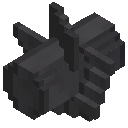 Turbine Rotor Shaft (Reinforced)
 The Rotor Shaft is the main component of the Turbine Rotor
The Rotor Shaft blocks must be placed one after the other inside the Turbine and must encompass its entire length, starting from the Rotor Bearing and ending against a Housing block on the other side.
The Rotor Shaft blocks must be placed one after the other inside the Turbine and must encompass its entire length, starting from the Rotor Bearing and ending against a Housing block on the other side.
Unrecognized page type: bigreactors:crafting1x
bigreactors:part_usage: Mandatory: yes
Valid positions: inside the Turbine
Variants: all
Graphical interface: no
Valid positions: inside the Turbine
Variants: all
Graphical interface: no
Computer Port 3 pages


The Computer Port allows you to connect your Turbine to a computer for complex automation tasks.
A standard set of methods is exposed to the connected computer and you can use them to query the status of the Turbine and control is behavior.
A standard set of methods is exposed to the connected computer and you can use them to query the status of the Turbine and control is behavior.
crafting-text: To use the Computer Port you need an external mod that add programmable computers to the game.
Currently the only such mod supported (and available) is CC:Tweaked.
Currently the only such mod supported (and available) is CC:Tweaked.
bigreactors:part_usage: Mandatory: no
Valid positions: any face (not on frame)
Variants: Reinforced
Graphical interface: no
Valid positions: any face (not on frame)
Variants: Reinforced
Graphical interface: no
Controller 4 pages


The Controller is your main interface to the Turbine.
Right click on the Controller to open it's graphical user interface and from there you can turn the Turbine on or off, check how much vapor and coolant are present in the internal tanks, how fast the Rotor is spinning and how much energy is being generated.
Right click on the Controller to open it's graphical user interface and from there you can turn the Turbine on or off, check how much vapor and coolant are present in the internal tanks, how fast the Rotor is spinning and how much energy is being generated.
You can also regulate how much vapor is flowing around the Rotor, what to do with the vapor once it's condensed back to the original coolant and engage or disengage the Induction Coils.
If you hover on a control in the interface, a tooltip will be displayed with additional information or an explanatory text for that control.
If you hover on a control in the interface, a tooltip will be displayed with additional information or an explanatory text for that control.
Unrecognized page type: bigreactors:crafting1x
bigreactors:part_usage: Mandatory: at least one is required
Valid positions: any face (not on frame)
Variants: all
Graphical interface: yes
Valid positions: any face (not on frame)
Variants: all
Graphical interface: yes
Creative Steam Generator 2 pages


The Steam Generator is a creative only part that act as a constant source of steam for a Turbine.
This part automatically supply as much steam as the maximum amount permitted by the part variant to the Vapor Fluid Tank, but only when the Turbine is active.
This part automatically supply as much steam as the maximum amount permitted by the part variant to the Vapor Fluid Tank, but only when the Turbine is active.
bigreactors:part_usage: Mandatory: no
Valid positions: any face (not on frame)
Variants: all
Graphical interface: no
Creative mode: this part is only available in creative mode and there is no crafting recipe for it.
Valid positions: any face (not on frame)
Variants: all
Graphical interface: no
Creative mode: this part is only available in creative mode and there is no crafting recipe for it.
Redstone Port 6 pages


The Redstone Port allows you to automate your Turbine using Redstone.
Open the Port graphical interface to configure it. You can then choose between three input settings (that listen for a Redstone signal) and four output ones (that emit a Redstone signal).
Open the Port graphical interface to configure it. You can then choose between three input settings (that listen for a Redstone signal) and four output ones (that emit a Redstone signal).
Input settings
Perform one of the following actions when a Redstone signal is received
On / Off : turn the Turbine on or off depending on the signal receivedInduction Coils : engage or disengage the induction coilsFlow Rate : change the maximum flow rate of vapor inside the Turbine.
Perform one of the following actions when a Redstone signal is received
On / Off : turn the Turbine on or off depending on the signal receivedInduction Coils : engage or disengage the induction coilsFlow Rate : change the maximum flow rate of vapor inside the Turbine.
Output settings
Emit a Redstone signal when one of the following conditions are meet
Rotor Speed : the speed of the Turbine rotor is above, below or in between a given valueCoolant amount : the amount of coolant in the Turbine is above, below or in between a given valueVapor amount : the amount of vapor in the Turbine is above, below or in between a given value
Emit a Redstone signal when one of the following conditions are meet
Rotor Speed : the speed of the Turbine rotor is above, below or in between a given valueCoolant amount : the amount of coolant in the Turbine is above, below or in between a given valueVapor amount : the amount of vapor in the Turbine is above, below or in between a given value
Energy Stored : the amount of energy stored in the internal energy buffer is above, below or in between a given value.
You will usually need two or more Redstone Port to fully automate a Turbine.
For more complex automations, check the Computer Port.
You will usually need two or more Redstone Port to fully automate a Turbine.
For more complex automations, check the Computer Port.
Unrecognized page type: bigreactors:crafting1x
bigreactors:part_usage: Mandatory: no
Valid positions: any face (not on frame)
Variants: all
Graphical interface: yes
Valid positions: any face (not on frame)
Variants: all
Graphical interface: yes
Variants (2)
Basic 1 page
As for the Reactor, the Basic variant is your starter Turbine.
With a maximum size of 5x5x10 blocks and mostly needing only iron ingots to craft, it's a cheap solution for your early/mid game energy needs.
Basic Turbines can use up to 1000 mB/t of vapor to spin their Rotor.
With a maximum size of 5x5x10 blocks and mostly needing only iron ingots to craft, it's a cheap solution for your early/mid game energy needs.
Basic Turbines can use up to 1000 mB/t of vapor to spin their Rotor.
Reinforced 2 pages
The Reinforced variant let you build Turbines as big as you need or want, to generate extreme amounts of energy.
The maximum size, up to 256 blocks, can be set by players, mod packs makers or server admins in the config file of Extreme Reactors.
Basic Turbines can use up to 2000 mB/t of vapor to spin their Rotor.
The maximum size, up to 256 blocks, can be set by players, mod packs makers or server admins in the config file of Extreme Reactors.
Basic Turbines can use up to 2000 mB/t of vapor to spin their Rotor.
Reinforced Turbines pay they superior structural integrity by being a bit more expensive to craft and not as efficient as the other variants but nothing that their superior generation capacity can't overcome.
The Reprocessor (1)
How to build 2 pages
The Reprocessor is a 3 by 3 and 7 blocks high machine build from Casing blocks and one each of the other device parts.
Glass can be used in place of Casing blocks in the vertical faces of the machine (but not on the frame).
Check each Reprocessor part page for restriction on where each part can be placed.
Glass can be used in place of Casing blocks in the vertical faces of the machine (but not on the frame).
Check each Reprocessor part page for restriction on where each part can be placed.
Unrecognized page type: zcmultiblock
The Turbine (3)
Inner workings 2 pages
How does a Turbine generate energy?
By spinning its Rotor.
The fluid from the Turbine Vapor Fluid Tank is pumped in the Rotor chamber, at the rate you configured in the Controller graphical interface.
A small amount of the vapor it's captured by each Rotor Blade making the Rotor spin.
By spinning its Rotor.
The fluid from the Turbine Vapor Fluid Tank is pumped in the Rotor chamber, at the rate you configured in the Controller graphical interface.
A small amount of the vapor it's captured by each Rotor Blade making the Rotor spin.
When the Induction Coils are engaged, energy is generated depending on the Rotor speed and the average values of properties like efficiency and drag amount of all your your coil blocks.
Please note that, while being close enough to let you create the best Turbines possible, this is an oversimplification of what's really going on inside your Turbine.
Please note that, while being close enough to let you create the best Turbines possible, this is an oversimplification of what's really going on inside your Turbine.
Inductor Coils 3 pages
An Inductor Coil is a block, usually metallic, that can be placed around the Rotor shaft and that, while engaged, will extract energy from it while slowing it down.
A particular coil could be more efficient at extracting energy from the spinning Rotor than another one, or may extract energy more rapidly then others.
A particular coil could be more efficient at extracting energy from the spinning Rotor than another one, or may extract energy more rapidly then others.
Usually a rare block, or one particularly expensive to craft, has better stats than a common, or cheap, one.
Extreme Reactors register, by default, a score of vanilla and modded blocks as Inductor Coils.
Other mods or mod packs can add their own moderators or modify/remove the default ones.
Extreme Reactors register, by default, a score of vanilla and modded blocks as Inductor Coils.
Other mods or mod packs can add their own moderators or modify/remove the default ones.
Only valid coils can be placed inside the Turbine, around it's Rotor shaft. Invalid blocks will prevent the Turbine multiblock from forming.
Blocks that can be used as Inductor Coils are marked with a special tooltip that you can see if you want to spoiler yourself and you have enabled the Advanced Tooltips feature of Minecraft (F3 + H).
Blocks that can be used as Inductor Coils are marked with a special tooltip that you can see if you want to spoiler yourself and you have enabled the Advanced Tooltips feature of Minecraft (F3 + H).
The Rotor 8 pages
The Rotor is the most important component of your Turbine as its design will have a direct impact on the energy production of the Turbine.
A Rotor is built using four types of blocks:a single Rotor Bearingsome Rotor Shaft blocksa number of Rotor Bladesa single Housing block.
A Rotor is built using four types of blocks:a single Rotor Bearingsome Rotor Shaft blocksa number of Rotor Bladesa single Housing block.
Unrecognized page type: bigreactors:zcmultiblock
Building the Rotor
The Rotor can be build following any of the three axis (X, Y, or Z) of the Turbine.
The first block of your Rotor mush be a Rotor Bearing placed on one face of the Turbine, usually in the middle.
Starting from the bearing, place down as many Rotor Shaft blocks as needed to reach the opposite face of the Turbine where it should meet a Housing there.
The Rotor can be build following any of the three axis (X, Y, or Z) of the Turbine.
The first block of your Rotor mush be a Rotor Bearing placed on one face of the Turbine, usually in the middle.
Starting from the bearing, place down as many Rotor Shaft blocks as needed to reach the opposite face of the Turbine where it should meet a Housing there.
After the shaft is complete, it's time to place some Rotor Blades down. They can be placed in any position that is perpendicular, and adjacent, to a Rotor Shaft or next to an already placed blade.
Your Rotor can have as many blades as you like, in any combination.
However, it's important to note that the number of blades, along with their vapor capacity, has a direct relation to the Rotor speed.
Your Rotor can have as many blades as you like, in any combination.
However, it's important to note that the number of blades, along with their vapor capacity, has a direct relation to the Rotor speed.
How many Blades?
Each Blade variant come with a maximum vapor capacity, the maximum amount of vapor they can capture and use to spin the Rotor.
Hover on a Blade in your inventory to see it's capacity.
Use this value to calculate how many Blades you need to handle the vapor flow rate you've set for your Turbine (in the Controller graphical interface).
Each Blade variant come with a maximum vapor capacity, the maximum amount of vapor they can capture and use to spin the Rotor.
Hover on a Blade in your inventory to see it's capacity.
Use this value to calculate how many Blades you need to handle the vapor flow rate you've set for your Turbine (in the Controller graphical interface).
Inductor Coils
To actually generate energy, you need to place al least some Inductor Coils at the end of your Rotor (near the closing Housing block.
And remember to engage them in the Controller graphical interface!
You can place up to three rings of coils, each ring consisting of up to eight coil blocks.
To actually generate energy, you need to place al least some Inductor Coils at the end of your Rotor (near the closing Housing block.
And remember to engage them in the Controller graphical interface!
You can place up to three rings of coils, each ring consisting of up to eight coil blocks.
Mixing coil types is permitted and, if you do so, the Turbine will make the average of the values of their properties.
Doing so allows you to start with easily available, or cheap, coils and then replace them gradually instead of waiting to have the more rare or expensive coils on hand.
In the following page you can see the example Rotor shown previously with some Inductor Coils added.
Doing so allows you to start with easily available, or cheap, coils and then replace them gradually instead of waiting to have the more rare or expensive coils on hand.
In the following page you can see the example Rotor shown previously with some Inductor Coils added.
Unrecognized page type: bigreactors:zcmultiblock
Ores (3)


Ingots & Materials (31)


Tools (1)
Machines & Other Blocks (74)





Other (16)


